How it works
How Groundbook works.
Groundbook is not one of the companies on the ground. It is the independent third party between them.
Why it exists, which records are made, what Groundbook does with them, who works with them, what we keep and who has access.
01Why
Five companies work on every aircraft on the ground, and each keeps its own version of the truth.
Ground checks are required; what they leave behind is not. A tick on a list remains, not what the person saw. When a dent is found at the next station, nobody can say at which turnaround it happened, and it comes down to one word against another.
Groundbook turns the check into a sealed record that is the same for every party. No one can change it silently, us included.
-
Money
Damage: who, when, where
A record on arrival and before departure narrows the window in which damage happened to one station. In a dispute, the last sealed record without a finding is at hand, not one word against another.
-
Time
From report to repair
A finding with a photo reaches the qualified person who decides on it, with the aircraft's history from every station at hand. Caught earlier means a smaller repair and less time on the ground.
-
People
Knowledge: the next generation
An experienced technician's procedure becomes a guided check. The app reads it aloud item by item and a new technician goes through it the same way.
02Types of record
A record of anything on the ground, from a walkaround to a repair.
- Aircraft
- airliner, ACMI, helicopter, business, club
- Ground equipment
- stairs, loader, tug, GPU, de-icing, fuel; recognised by its QR tag
- Place
- stand, apron, hangar, gate
- Flight and work
- flight, aircraft turnaround, work card
-
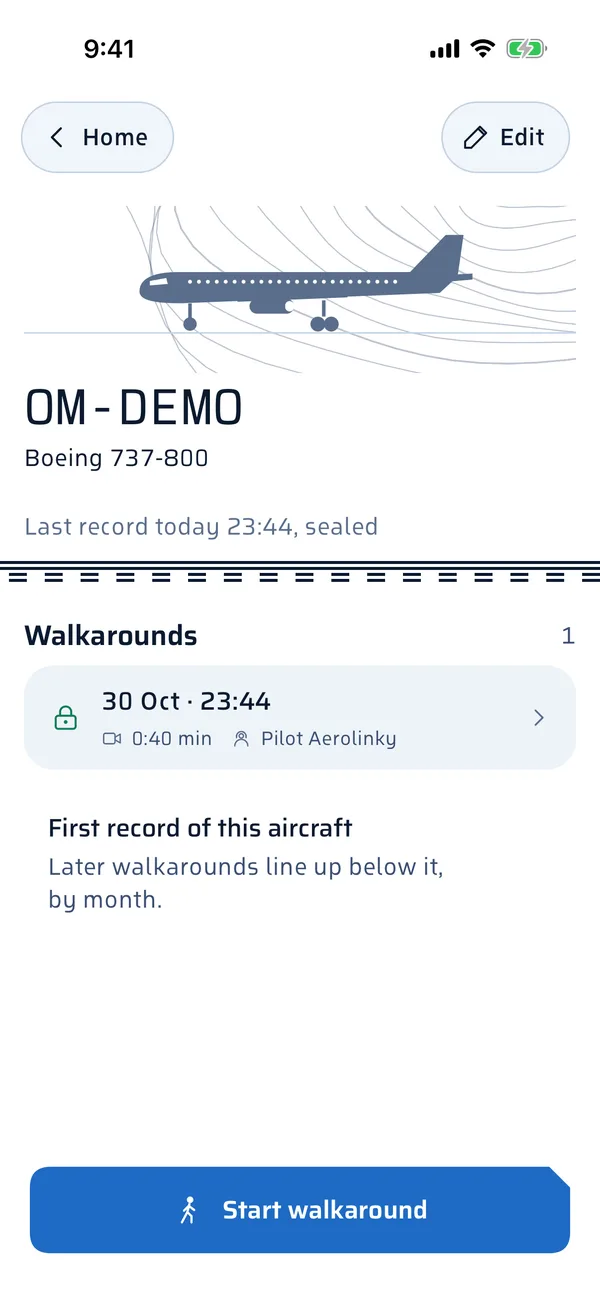
Aircraft walkaround
- Who makes it
- technician, pilot, crew, ramp agent
- What it carries
- on arrival, before departure, before flight; sector by sector for the aircraft type; also a short arrival snapshot: a few shots and one confirmation, seconds
-
Guided check
- Who makes it
- technician, mechanic, crew
- What it carries
- the organisation's checklist read aloud, confirm and go back, head-mounted camera
-
Final walkaround after maintenance
- Who makes it
- maintenance technician
- What it carries
- a walkaround after the last work: tools, foreign objects, panels (EASA Part-145, 145.A.48)
-
Aircraft turnaround
- Who makes it
- ground handling
- What it carries
- arrival and departure, the aircraft's condition before and after servicing, equipment at the aircraft
-
Equipment check
- Who makes it
- equipment operator
- What it carries
- at the start of a shift, the equipment's condition, findings
-
Stand check
- Who makes it
- airport, ground handling
- What it carries
- before arrival and after departure, foreign objects, apron condition
-
Report
- Who makes it
- anyone at the aircraft, and the public via a QR code at the airport
- What it carries
- one tap, a photo or video, goes to the right person
-
Handover and return
- Who makes it
- the operator's technician or crew; the lessor and the insurer receive it
- What it carries
- a pair of records, one link, old damage versus new
-
Finding and repair
- Who makes it
- maintenance, workshop
- What it carries
- a finding as an item with its own history, a named decision, the repair, the final walkaround after maintenance
Complements the work card and the certificate of release to service, does not replace them.
03What Groundbook does
Findings, decisions and work in one place, with whoever decides.
The path of a finding
- Finding: filmed at the aircraft
- Expert: weighs in remotely
- Approval: the customer, from a link
- Repair: a decision with a name and time
- Final walkaround: no tools left, panels back on
- History: the same spot at the next check
-
Customer approval from a link
A finding with its record goes to the aircraft's owner or operator, who approves or rejects the repair straight from the link. The decision is recorded with a name and a time.
-
Remote expert
The technician at the aircraft shares a live view with an experienced technician, the manufacturer or a workshop. The call and its conclusion are attached to the finding.
-
Changes between checks
The same part of the aircraft side by side over time: the last record without a finding and today's. A person judges what has changed.
-
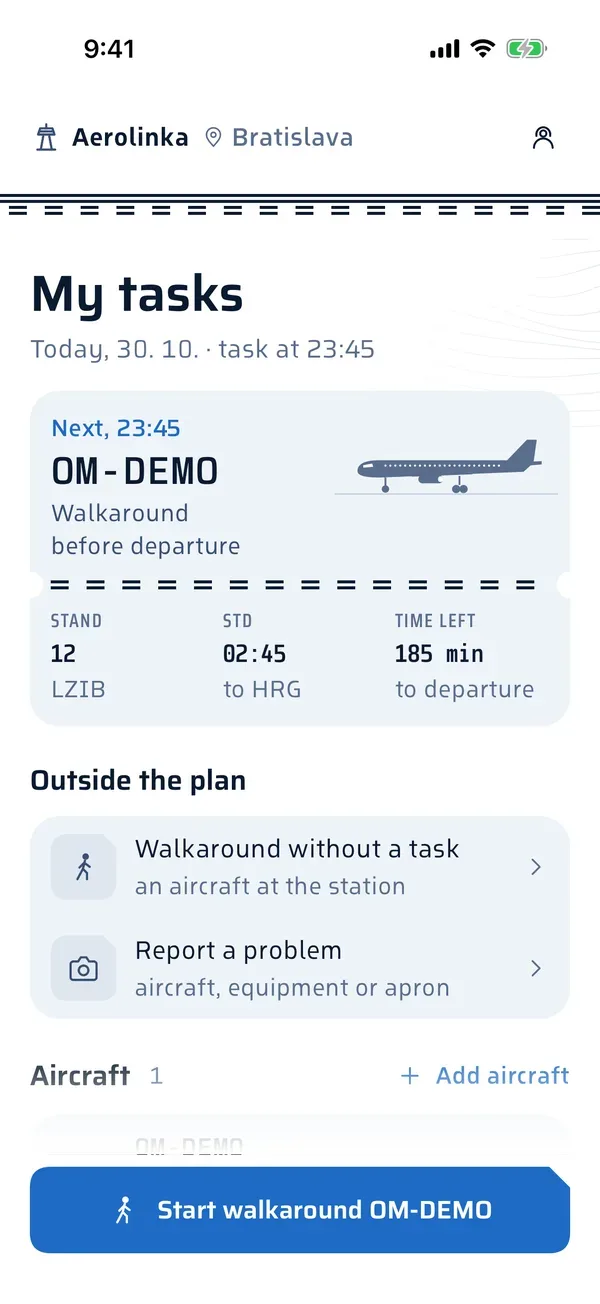
Tasks from the plan
Groundbook prepares what is to be done for which subject. The app simply starts it.
-
Shorter AOG
The finding, the history of the spot and the decision in one place, reaching whoever decides within minutes.


04Tasks from the plan
Tasks arrive by themselves, from the flight plan and the rules.
The manager or OCC sets in Groundbook which flights create tasks and for whom. The flight plan and the rules together give the day's tasks; you can always add a task by hand. Without a rule of your own, there is a task before every departure.
A task rule
- Type
- before departure, after arrival, technical check
- When
- every departure; only the first departure of the day at a station; the night stop, that is the last arrival of the day; an aircraft swap
- Stations
- the stations where the rule applies
- Window
- how long before departure or after arrival
- For whom
- a role or a named person
- Fleet
- 10 Boeing 737 aircraft
- Flights
- 4 departures a day per aircraft
- Period
- 30 days
- Departures
- 40a day · 1 200 in 30 days
- Tasks before every departure
- 40a day · 1 200 in 30 days
- Tasks at the night stop
- 10a day · 300 in 30 days
- Total with both rules
- 50a day · 1 500 in 30 days
The actual number of tasks follows from the organisation's rules and its flight plan.
Discipline
-
The task arrives by itself
To a named person, with the aircraft, flight and stand; there is nothing to choose in the app.
-
A reminder before the window
People know in time that a task is waiting for them.
-
When a task is not done
After a while, OCC is alerted.
-
Departure coverage
The share of departures with a sealed walkaround before departure, by station and aircraft, monthly and for management too.
05Who does what
The person on the spot records. A qualified person decides.
-
Records
A technician, pilot, crew member, ramp agent, equipment operator or workshop technician in the Walk-Check app; the public via a QR code at the airport, without an account.
-
Decides
A qualified person on the owner's side, such as MCC, CAMO or airport operations. The decision is recorded with their name.
-
Reads
OCC, MCC and management in Groundbook, an auditor with a read-only role, the airport what was recorded on its apron, and a third party what the owner shares with it.
-
Administers
The organisation's manager invites people, assigns their roles and decides who receives a record.
AI recognises aircraft parts in the video, drafts a report from what was said for a person to send, and suggests who it belongs to. It never declares an aircraft free of damage and never seals anything.
06What we keep
We keep records, not tabs on people.
- What
- The video or photo, who, when, the subject of the record and the seal: the fingerprint of the record and data, our signature and an external timestamp.
- How long
- Video and photos open instantly for four years, then moves to an archive and is restored on request. Ten years where agreed in the contract.
- Where
- Encrypted, in the European Union, in Frankfurt.
- Faces
- In the copy shown outside the organisation, people in the footage are blurred.
- Changes
- A sealed record is never overwritten silently: a correction is appended with the old and the new value, a deletion on request with who asked for it and when.
- Location
- A record carries where it was made and the path taken during it. Outside a record, we do not track location.
07Who has access
The owner of a thing decides who gets access to its history, and for an aircraft that is its operator. Whoever is on a record sees it.
Opening and verifying a record is always free. Whoever records, or works with the history for themselves, pays: the operator, club, school or owner for aircraft with a record in the month, every other party for a station or workspace, not for an aircraft: the airport for its own apron, a handler for its own equipment, a workshop for work it runs for several customers, an insurer or lessor for its own workspace.
| Who | Access to | How |
|---|---|---|
| Aircraft operator | all records of its aircraft | by signing in to Groundbook |
| Organisation team | the organisation's records by role: manager, team member, read only | by signing in, invited by the manager |
| Whoever is on the record | the handler, the workshop and others, to the records they are on | by signing in to their own organisation |
| Airport | what was recorded on its apron | by signing in to Groundbook |
| Third party | the record the aircraft operator or the owner of the thing shares: insurer, surveyor, lessor, authority | a link valid for 1 to 90 days, no account, with a PDF report |
| Anyone who received the record | verifying that it has not changed since it was sealed | with the public verifier, without us |
| The public | an airport's public overview, where the operators agree: how many checks were made on its apron, without record content or names | on the airport's page in Groundbook |
08Access request
Need a record of an aircraft that is not yours?
Tell us which aircraft, when and where, who you are and why you need the record. The request comes to Groundbook, we pass it to the aircraft operator and the operator decides. If they agree, you receive a link that opens without an account.
09Groundbook Edu
How to work with it: the standard and guides by role.
The public source of truth for all of Groundbook, and guides for everyone who records, decides or receives a record on the ground.
- The Groundbook standard For anyone who writes the rules, records or reads: airlines, handlers, airports, workshops, lessors, insurers and authorities.
- Technician and crew at the station Technicians, crews and ramp agents who do walkarounds in the Walk-Check app.
- Operations: OCC and MCC in Groundbook OCC, MCC, heads of maintenance and management.
- Maintenance and workshop Maintenance technicians in an operator's own maintenance, and independent MRO workshops working at a customer's aircraft.
- Handling and airport Ramp agents, turnaround leads, equipment operators, and airport operations and safety.
- Club, school and owner Flying clubs, flying schools and owners of small aircraft.
- Organisation manager Managers of organisations that record with Walk-Check and work in Groundbook.
- Third party: verifying a record Insurers, surveyors, lessors, airports and authorities.
Groundbook
Sign in to Groundbook
Groundbook is the web app for your operation, one for everyone: operators, workshops, handlers, airports and clubs. Sign in with the same account as in the Walk-Check app; if you have none, your organisation's manager will invite you.
Walk-Check
Records are made in the Walk-Check app
For iOS and Android. Clubs, schools and owners of small aircraft sign up in the app themselves.